
基尼系数python代码
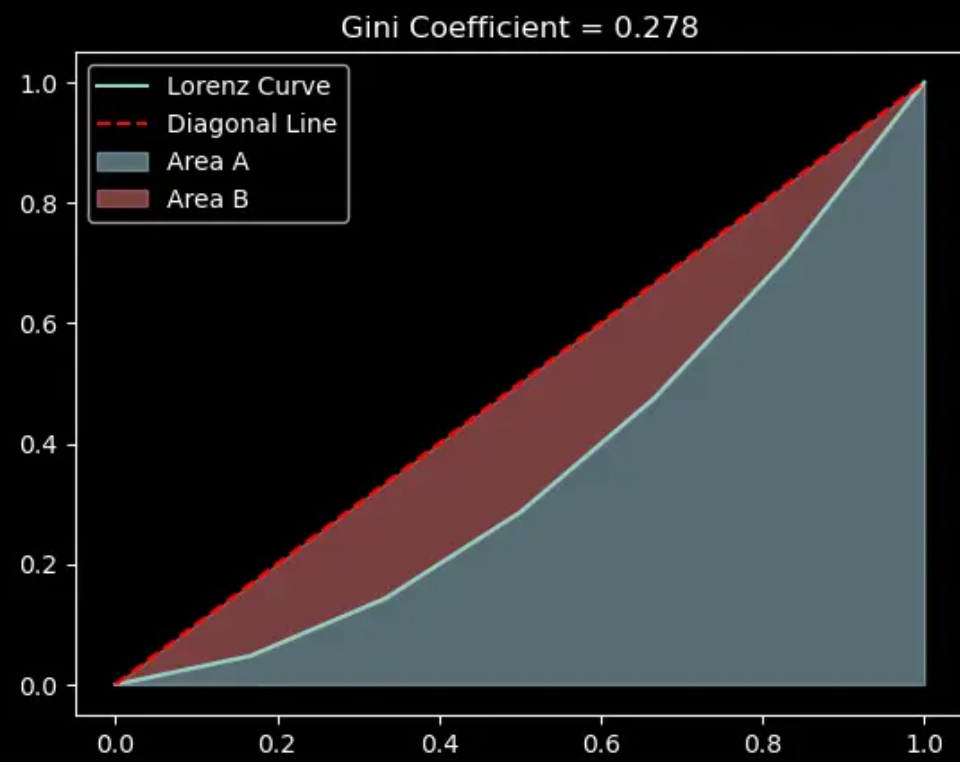
数据为[6000, 1000, 2000, 3000, 4000, 5000],每一步的变化如下:
- 输入数据:
[6000, 1000, 2000, 3000, 4000, 5000] - 对输入数据进行排序:
[1000, 2000, 3000, 4000, 5000, 6000] - 计算累积和:
[1000, 3000, 6000, 10000, 15000, 21000] - 计算累积和的占比(归一化):
[0.04761905, 0.14285714, 0.28571429, 0.47619048, 0.71428571, 1.0] - 加0:
[0, 0.04761905, 0.14285714, 0.28571429, 0.47619048, 0.71428571, 1.0] - 计算两点平均值:
[0.02380952 0.0952381 0.21428571 0.38095238 0.5952381 0.85714286] - 计算 A:
0.3611111111111111 - 由于归一化,B = 0.5 - A。计算 gini:B / (A+B) =
0.2777777777777778
所以最终的Gini系数为0.278。这个结果表示了该财富分布的不平等程度,Gini系数越接近1,表示财富分布越不平等;Gini系数越接近0,表示财富分布越平等。在这个例子中,Gini系数为0.278,说明该财富分布相对较为平等。
python代码如下
import numpy as np
import pandas as pd
import matplotlib.pyplot as plt
def calculate_average(input_list):
# 在列表开头添加0
new_list = np.insert(input_list, 0, 0)
# 使用向量化操作对新列表中相邻的元素进行平均计算
result_list = (new_list[:-1] + new_list[1:]) / 2
return result_list
def calculate_gini(input_list):
# 对输入数据进行排序,并计算累积和,并进行归一化
input_list = np.cumsum(sorted(input_list)) / np.float64(np.sum(input_list))
# 调用calculate_average函数,计算累积和数组相邻元素的平均值
result = calculate_average(input_list)
# 计算a1,即平均值的平均值
a1 = np.sum(result) / len(input_list)
# 设置常数a2为0.5,计算Gini系数
a2 = 0.5
gini = (a2 - a1) / a2
return input_list, gini
# 测试示例
input_list = np.array([6000, 1000, 2000, 3000, 4000, 5000])
input_list_2, gini = calculate_gini(input_list)
input_list_2 = np.insert(input_list_2, 0, 0)
# 对 x 轴和 y 轴进行归一化
normalized_x = np.linspace(0, 1, len(input_list_2))
normalized_y = input_list_2
# 绘制基尼系数曲线
df = pd.DataFrame({'x': normalized_x, 'y': normalized_y})
ax = df.plot(x='x', y='y', legend=False)
# 绘制对角线
plt.plot([0, 1], [0, 1], color='red', linestyle='--')
# 标记两个面积
plt.fill_between(df['x'], df['y'], color='lightblue', alpha=0.5)
plt.fill_between(df['x'], df['y'], df['x'], color='lightcoral', alpha=0.5)
# 设置图例和标题
plt.legend(["Lorenz Curve", "Diagonal Line", "Area A", "Area B"])
plt.title(f"Gini Coefficient = {gini:.3f}")
# 显示图形
plt.show()
关注公众号「水沐教育科技」,在手机上阅读所有教程,随时随地都能学习。内含一款搜索神器,免费下载全网书籍和视频。

微信扫码关注公众号